Use Cases

Microsoft set December 31, 2026 as the end-of-support date for Dynamics 365 Guides and Remote Assist. Microsoft says both apps stop functioning after that date and the data remains in Dataverse. Identify which guides people still open and which support calls they still need to make. Microsoft lifecycle announcement
Look at what a technician needs from each guide. A trainer may use it to teach part names and assembly order before a shift. An operator may depend on the same guide to place an instruction over a specific component on the machine. Those jobs call for different tests when you evaluate a replacement.
Start here if your team has a library of current guides and wants to keep the sequence and media. Altoura documents imports from a connected Dynamics 365 environment. frontline.io documents file-based imports into Interactive Flows and flags limits on some branching between tasks. Ask which access, file format and workspace settings the importer requires while you can still retrieve a sample. Altoura import documentation · frontline.io import documentation
Choose a guide with a video, a 3D asset and a decision branch. Open the import on the device operators will use. Follow each branch and log what carries over, what needs repair and who can make the repair. Use the time it takes to fix and review this guide to estimate the effort for the rest of the library.
This matters when the location of an overlay tells the operator which part or area to work on. Evaluate an augmented reality work-instruction platform in the intended work area. PTC Vuforia Expert Capture, for example, documents model tracking for objects that match the model’s size and shape and stay in the same state during the procedure. Check that condition for your task if it involves removing parts. PTC model-tracking documentation
Have the process owner identify the overlays where alignment matters most. Check placement from the operator’s usual working positions, after moving away and returning, and across equipment variants used on site. Run the test with the intended device, lighting and network. Agree on what the operator should do if tracking is lost before you approve the workflow.
Choose this path when a technician’s next step depends on someone seeing the situation and responding in real time. Microsoft points to spatial annotations in Teams mobile for certain Remote Assist scenarios. A dedicated remote-support tool is another option if your team needs a particular device, call flow or hands-free setup. Microsoft Teams spatial annotations
Run one realistic call from the work area. Have a technician reach the person who normally handles an escalation and check whether that expert can see and identify the part in question. Include guest access if an outside supplier provides support. Microsoft’s guidance lists a compatible mobile device and a qualifying license as prerequisites for spatial annotations. Confirm with your IT team which license will cover the call after retirement. Microsoft Teams prerequisites
Choose this path when the goal is to learn the parts and sequence before working on the equipment. You’ll need a model that matches the machine revision, a current approved work instruction and an expert who can review the lesson. If several Guides cover variants of the same task, test one revision first and use what you learn to plan the rest. Convai equipment training overview
Create one inventory row per guide. Record the site, equipment revision, guide owner, device and source work instruction. Note any media, decision branches or physical anchors the guide relies on. Give each row a disposition. Import current content you plan to keep using, rebuild lessons tied to changed work, and archive superseded guides for reference.
Keep original CAD, approved instructions, photos, videos and translations in a repository your team can access independently of Guides. Have the person rebuilding the lesson open the source files from there before you rely on the archive.
If the PC app is still available, Microsoft documents packaging a guide as a read-only .guide file for archiving. Microsoft describes viewing these packages in HoloLens operator mode and recommends checking permissions before sharing the copy. Its separate Content Migration Tool copies content between Dataverse environments. If the app is already unavailable, have your Dataverse administrator check which records and assets your team can retrieve. Microsoft packaging instructions · Microsoft Content Migration Tool
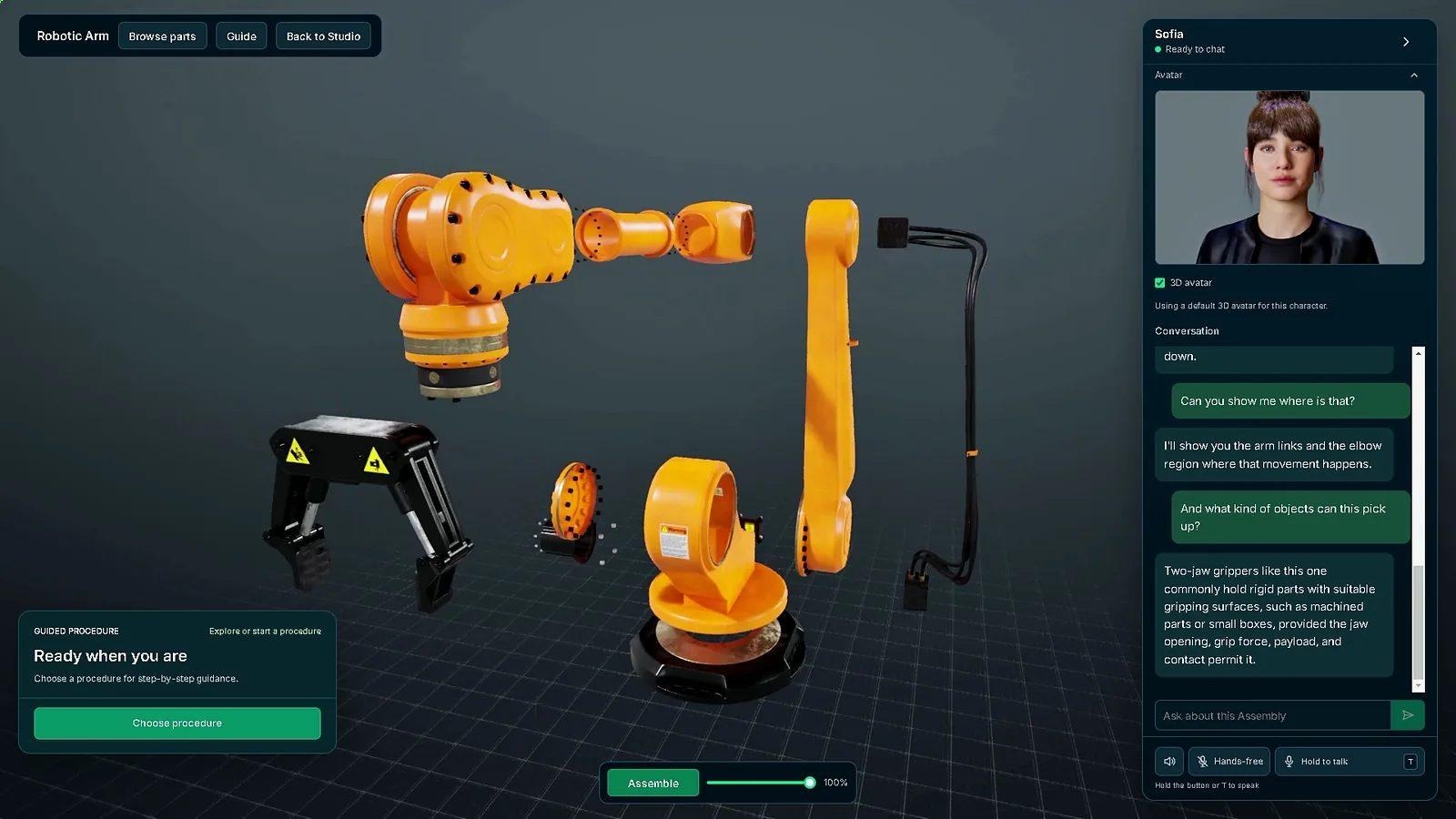
Take an illustrative lesson on an industrial robot gripper. The training lead wants a new technician to distinguish the replaceable fingertip from the jaw body before working with the equipment. Begin with the CAD assembly for that exact gripper and the approved work instruction. Mark the view in which the two parts are easiest to confuse and note the term the instruction uses for each one.
In early-access Assembly Studio, you can explore the assembly in 3D, ask about parts by voice and draft steps for expert review. An expert checks the part names, sequence and required checks against the approved instruction. A learner then tries a question they might ask during training, such as “Which piece is the fingertip?” Record whether the learner can point out both parts and explain how to distinguish them.
As you watch the Assembly Studio overview, pick a step from one of your existing guides where trainees confuse two parts. Note the view that would help them tell the parts apart and the term they should use to describe each one.
Assembly Studio overview (1:29). A CAD model becomes the basis for a draft training procedure.
The second demo focuses on turning manuals and SOPs into AI-guided training. Bring the current, approved work instruction to this part of the evaluation. Select one step with a clear outcome and note its revision and part name. That gives your reviewer a source to check against the rebuilt lesson.
Turn Manuals and SOPs into AI-Guided Training, a Convai Assembly Studio demo.
After watching, compare the step you selected with the information in the old guide. If the guide has a useful photo or a branch the SOP leaves to a supervisor, record what you still need and who can resolve it before testing with trainees.
Write down the acceptance criteria before the demo. For the gripper lesson, ask a learner to identify both parts using the current materials. After the 3D lesson, ask them to identify the parts from a different viewing angle and explain their choice. Note where they need prompting in each attempt. That gives the training lead a concrete observation to discuss with the expert.
Track the author’s setup and correction time as well. Record whether the model opened on the intended device, which draft steps the expert corrected, and who signs off on future revisions. Keep the pilot in training until the process owner approves the lesson for its intended use. Choose a second lesson once the first meets the agreed criteria and the team can maintain it.
For a CAD-based evaluation, bring one equipment procedure, the model revision, the approved work instruction and a specific outcome for the trainee.


